


Jump to content
View in the app

A better way to browse. Learn more.

Foro AtlantisRO

A full-screen app on your home screen with push notifications, badges and more.

To install this app on iOS and iPadOS
  1. Tap the Share icon in Safari
  2. Scroll the menu and tap Add to Home Screen.
  3. Tap Add in the top-right corner.
To install this app on Android
  1. Tap the 3-dot menu (⋮) in the top-right corner of the browser.
  2. Tap Add to Home screen or Install app.
  3. Confirm by tapping Install.

Chelsea

Members
  • Ingreso

  • Última visita

  1. En cuanto va la carta? PM por favor.
  2. Estimados: Vendo Orc Hero Card en Monocle Vendo Amdarais Card en Hero trade mail+8 Mande ofertas por PM. ?
  3. Hola Comunidad: Compro Thanatos Katar+9 Con Hunter Fly Card Mande Privado ?
  4. Chelsea publicó un tema en Ventas
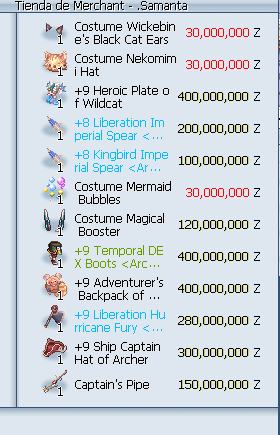
    Hola comunidad: Vendo lo siguiente agregandole un Orc Hero Card en Monocle. Mande Privado?
  5. Chelsea responde a Chelsea de tema en Compras
    Up jeje
  6. Chelsea publicó un tema en Compras
    Compro lo siguiente: Costume Orejas Ifrit Costume Charleston Antenna. Comprados ☺️
  7. V/Temporal dex+9 Expert Archer 4 y Hawkeyes Mande oferta.
  8. Tal cual el titulo Costume Heart Wing Hairband?
  9. Chelsea publicó un tema en Compras
    C> HEROIC TRADE INBOX $$
  10. Hola Amiwit@s Compro Rune Helm Costume y Costume Classical Ribbon n.n Deje $$$ en inbox plx
  11. UP ~ INBOX $$
  12. C>ORC HERO en Sunglasses o suelta INBOX Ofertas

Configure browser push notifications

Chrome (Android)
  1. Tap the lock icon next to the address bar.
  2. Tap Permissions → Notifications.
  3. Adjust your preference.
Chrome (Desktop)
  1. Click the padlock icon in the address bar.
  2. Select Site settings.
  3. Find Notifications and adjust your preference.