
Jump to content
View in the app

A better way to browse. Learn more.

Foro AtlantisRO

A full-screen app on your home screen with push notifications, badges and more.

To install this app on iOS and iPadOS
  1. Tap the Share icon in Safari
  2. Scroll the menu and tap Add to Home Screen.
  3. Tap Add in the top-right corner.
To install this app on Android
  1. Tap the 3-dot menu (⋮) in the top-right corner of the browser.
  2. Tap Add to Home screen or Install app.
  3. Confirm by tapping Install.

Homunculus Supplement (100371) no otorga intimidad/lealtad al homunculo

Al darle el suplemento al nuevo homunculo, no recibe intimacy el mismo.
Ya le he dado entre 5 y 6 pero no aumenta, solo se consume el item.
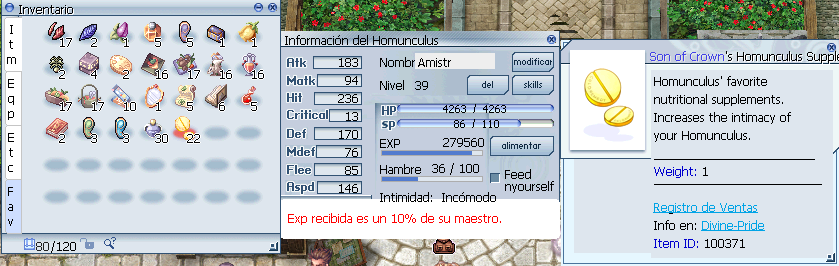
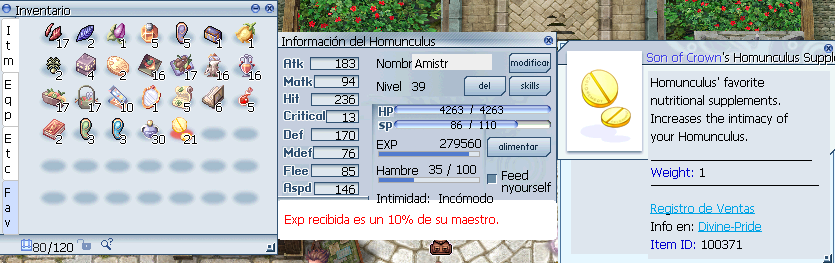
image.png

image.png

Críticas de usuarios

Comentarios recomendados

Publicado

Gracias @Crowness00, vamos a hacer pruebas, según la DB del juego:

  - Id: 100371
    AegisName: Homun_F_Tablet
    Name: Homunculus Nutritional Supplement
    Type: Usable
    Weight: 10
    Script: |
      addhomintimacy 100; // !TODO: Confirm increase amount

Pero no está claro si está funcional, lo investigaremos.

Crowness00

Members
Publicado

Hola, acabo de ver dentro del juego con "@hominfo" y otorgan 5 de intimacy al homunculo, paso de 128 a 133; e investigando en IRo (dejo el link https://irowiki.org/wiki/Homunculus_System en la sección de Humunculus Tablets) debería otorgar 50 puntos, aunque varia según el servidor claro, igualmente agradezco la respuesta.

image.png

Publicado

@Zetsumei ok todo lo confirmaria, se deberia proceder con un valor de 1000, correcto? Para que sea los 50 que citan la mayoria de las fuentes.

Si está todo ok procedo con el fix en la próxima item DB y te lo paso.

Join the conversation

Puede publicar ahora y registrarse más tarde. Si tiene una cuenta, iniciar sesión para publicar con su cuenta.

Guest
Add a comment...

Configure browser push notifications

Chrome (Android)
  1. Tap the lock icon next to the address bar.
  2. Tap Permissions → Notifications.
  3. Adjust your preference.
Chrome (Desktop)
  1. Click the padlock icon in the address bar.
  2. Select Site settings.
  3. Find Notifications and adjust your preference.