
Tekila
Soporte
-
Ingreso
-
Última visita
Todo lo publicado por Tekila
-
 Hola, si mal no recuerdo los buches de noel los consigues equipandote un 'Snowman Hat [1]'
 -
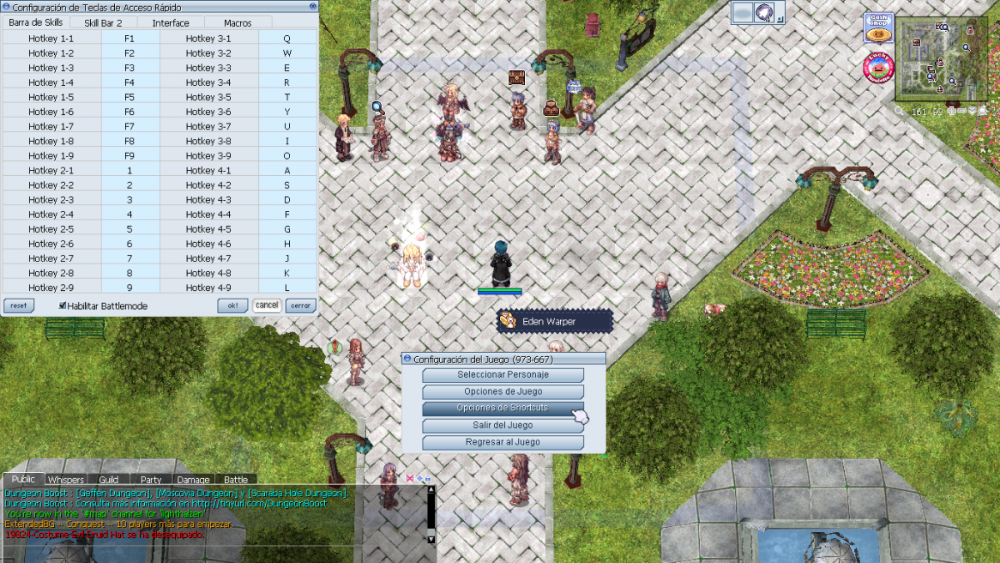
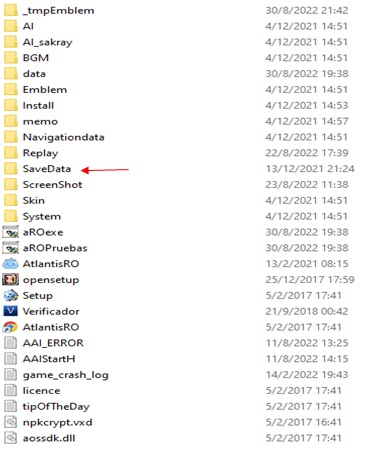
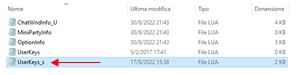
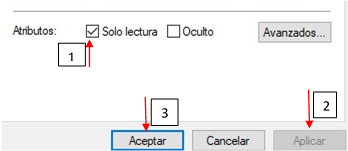
Paso 1: Tener solo un cliente abierto (solo para poder configuarar) Ir a opciones de Shortcuts y acomodar a gusto sus teclas rapidas, luego guardar o ok, en mi caso es el siguiente: Paso 2: Sin cerrar el cliente, ir a donde tengan instalado el Atlantis ro, en mi caso C:\AtlantisRO, luego buscar la carpeta SaveData y entrar. Paso 3: En esta carpeta habrá algunos archivos lua, busquen ‘UserKeys_s’ debería ser el último Paso 4: Dar Clic derecho sobre UserKeys_s, luego clic en propiedades, marcar la casilla ‘Solo Lectura’; aplicar y aceptar Paso 5: Cerrar el juego, al volver abrir el juego tendrán sus shortcuts acomodados, como lo dije es temporal y todo cambio que intenten hacer dentro de los shortcuts después de este cambio no se guardará a menos que quiten el modo de ‘solo lectura’ y para guardarlo vuelvan hacer todos los anteriores pasos. Créditos al usuario !Anteros.
-
Buenas tardes, ¿podrías facilitarme una cuenta de discord para ayudarte?
-
:v
-
Noooooo, murió mi grf ?