
Jump to content
View in the app

A better way to browse. Learn more.

Foro AtlantisRO

A full-screen app on your home screen with push notifications, badges and more.

To install this app on iOS and iPadOS
  1. Tap the Share icon in Safari
  2. Scroll the menu and tap Add to Home Screen.
  3. Tap Add in the top-right corner.
To install this app on Android
  1. Tap the 3-dot menu (⋮) in the top-right corner of the browser.
  2. Tap Add to Home screen or Install app.
  3. Confirm by tapping Install.

Este item no se puede tradear ni guardar en kafra storage, es de la cash shop y siempre había sido tradeable.
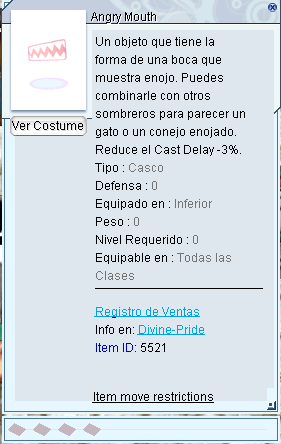
Captura de pantalla 2025-12-20 004844.png

Críticas de usuarios

Comentarios recomendados

KonPeko

Members
Publicado

Ya estaba reportado por otro player.

Publicado

Duplicado - Se retoma en:


Publicado

 Se agrega en breve al Changelog de la desconexión: 


Guest
This is now closed for further comments

Configure browser push notifications

Chrome (Android)
  1. Tap the lock icon next to the address bar.
  2. Tap Permissions → Notifications.
  3. Adjust your preference.
Chrome (Desktop)
  1. Click the padlock icon in the address bar.
  2. Select Site settings.
  3. Find Notifications and adjust your preference.