
-
Unreal Guild Recluta!
Upcito pa estos muertasos
-
Unreal Guild Recluta!
Estamos en el limbo entre on y off :D
-
Unreal Guild Recluta!
UNREAAAAAAAAAAAAAAAAAAAAAAAAAAAAAAAAAAAAAAAAAAAAAAAL!! como dice el paffy coshino. CUMing soon...(?)
-
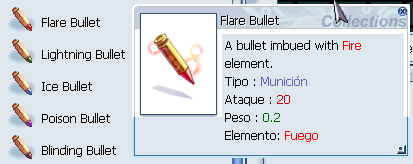
Municiones Sphere Para Gunslinger. Como se consiguen?
Yo si pude crear el arma o.o La npc que debes de llevarle las spheres en la guia pide las nuevas balas elementales pero de lvl bajo (las de la maquina de pronte). Las elemental spheres fueron cambiadas por esas balas elementales ;D
-
Unreal Guild Recluta!
La guild por el momento anda off hasta nuevo avis0oo0o0 ;D PD: Srry por responder tarde, pero ya ni checamos post en foro y en discord.
-
Unreal Guild Recluta!
holi soy nuevito y dejo mi up :D
-
Unreal Guild Recluta!
- Unreal Guild Recluta!
- Desconexión 26 de Noviembre 2021
El pinche thana costume!!!!!!!!!!!!!!! >:(Kades empezó a seguir FromHeroToZeroFromHeroToZero empezó a seguir Kades- Unreal Guild Recluta!
Felinitos Unreal!! :v Unreal- Desconexión 29 de Abril 2021
pal 2023 sin falta crack(?)- Desconexión 29 de Abril 2021
aaaaah perro, pinche shaka(?)- Unreal Guild Recluta!
Felinitos recluta n.n- Desconexion 27 de Diciembre 2020
Tengo un error al usar el comando /who dentro del juego, dice que hay 590 players de los 1,5k que habian(?) A_AFromHeroToZero empezó a seguir TheOne- Woe 23/10/20
Felinitos recluta. Fin del comunicado. - Unreal Guild Recluta!

Account
Buscar
Configure browser push notifications
Chrome (Android)
- Tap the lock icon next to the address bar.
- Tap Permissions → Notifications.
- Adjust your preference.
Chrome (Desktop)
- Click the padlock icon in the address bar.
- Select Site settings.
- Find Notifications and adjust your preference.
Safari (iOS 16.4+)
- Ensure the site is installed via Add to Home Screen.
- Open Settings App → Notifications.
- Find your app name and adjust your preference.
Safari (macOS)
- Go to Safari → Preferences.
- Click the Websites tab.
- Select Notifications in the sidebar.
- Find this website and adjust your preference.
Edge (Android)
- Tap the lock icon next to the address bar.
- Tap Permissions.
- Find Notifications and adjust your preference.
Edge (Desktop)
- Click the padlock icon in the address bar.
- Click Permissions for this site.
- Find Notifications and adjust your preference.
Firefox (Android)
- Go to Settings → Site permissions.
- Tap Notifications.
- Find this site in the list and adjust your preference.
Firefox (Desktop)
- Open Firefox Settings.
- Search for Notifications.
- Find this site in the list and adjust your preference.