Jump to content
View in the app

A better way to browse. Learn more.

Foro AtlantisRO

A full-screen app on your home screen with push notifications, badges and more.

To install this app on iOS and iPadOS
  1. Tap the Share icon in Safari
  2. Scroll the menu and tap Add to Home Screen.
  3. Tap Add in the top-right corner.
To install this app on Android
  1. Tap the 3-dot menu (⋮) in the top-right corner of the browser.
  2. Tap Add to Home screen or Install app.
  3. Confirm by tapping Install.

Error de dbgd en Toy horror

Buenas tardes,

Traigo un problema que me esta jodiendo mucho y es sobre un problema con la parte gráfica. desde hace tiempo que estoy ingresando a toy horror y en un punto cuando estoy cerca de matar a kimi aparece un error después de una serie de ataques y de área y luego se crashea teniendo que salir del juego, tengo el dgvoodoo y esta es la configuración que tenia, además de que tenia los efectos desactivados durante la pelea con kimi, pero el error sigue saliendo

La laptop que uso es una ASUS ExpertBook B1403CVA I3
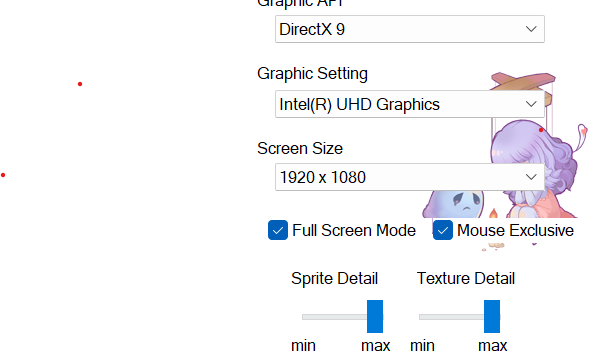
imagen.png

imagen.png

Críticas de usuarios

Comentarios recomendados

Publicado

Saludos! paso a etiquetar a mis compañeros @Zetsumei y @Karas para que te apoyen cuando tengan oportunidad.

Join the conversation

Puede publicar ahora y registrarse más tarde. Si tiene una cuenta, iniciar sesión para publicar con su cuenta.

Guest
Add a comment...

Account

Navigation

Buscar

Configure browser push notifications

Chrome (Android)
  1. Tap the lock icon next to the address bar.
  2. Tap Permissions → Notifications.
  3. Adjust your preference.
Chrome (Desktop)
  1. Click the padlock icon in the address bar.
  2. Select Site settings.
  3. Find Notifications and adjust your preference.