




Jump to content
View in the app

A better way to browse. Learn more.

Foro AtlantisRO

A full-screen app on your home screen with push notifications, badges and more.

To install this app on iOS and iPadOS
  1. Tap the Share icon in Safari
  2. Scroll the menu and tap Add to Home Screen.
  3. Tap Add in the top-right corner.
To install this app on Android
  1. Tap the 3-dot menu (⋮) in the top-right corner of the browser.
  2. Tap Add to Home screen or Install app.
  3. Confirm by tapping Install.

Tabla de líderes

Contenido popular

Showing content with the highest reputation on 07/01/26 en todas las areas

  1. Hola @saotochi, buen día, gracias por el reporte, sí, es un ID que teníamos en Hercules que debía ser reemplazado, por favor envía Ticket a Dohko para que se te repongan las 50 Coins. Yo pasaré a dejarle aviso. Disculpa la molestia.
  2. 1 punto
    Hola, gracias por la sugerencia, Dohkos forma parte de la rotación de eventos, eventualmente regresará pero aun no es su turno.
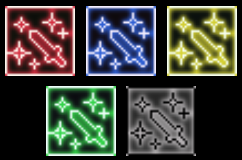
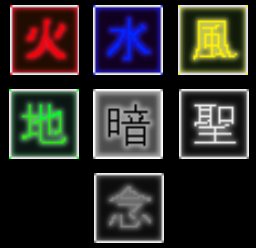
  3. @XxErickxX @Arthegas @msebastian.torres@gmail.co @saotochi @kurvo Hice estos candidatos (personalmente), de momento serian los tentativos si se aprueba implementar (únicamente se debe ajustar lado cliente). en orden: Fuego, Agua, Viento, Tierra, Dark, (Holy y Ghost)
Account

Navigation

Buscar

Configure browser push notifications

Chrome (Android)
  1. Tap the lock icon next to the address bar.
  2. Tap Permissions → Notifications.
  3. Adjust your preference.
Chrome (Desktop)
  1. Click the padlock icon in the address bar.
  2. Select Site settings.
  3. Find Notifications and adjust your preference.